Top 10 Digital Bus Stop Sign Innovations Transforming Urban Transit
2026-09-15
Ask any daily rider what they actually see at the bus stop, and you'll hear the same complaints: faded schedules, no clue when the next bus is coming, and zero help after dark. That’s exactly the problem digital bus stop signs are solving—fast. In the push toward smarter cities, the top 10 innovations below do more than display routes: they predict arrivals in real time, adjust for accessibility needs, run on solar, and even sense passenger flow. As agencies upgrade their fleets, many are choosing hardware built for real-world curb conditions, like zemso. Here are the ideas making public transit easier to use—and harder to ignore.
Arrival Times Recalculated Every 5 Seconds, Not Every Minute
Riders no longer have to watch a minute tick by before the next refresh. The system pings the network every five seconds and pushes fresh arrival estimates the moment a bus clears an intersection or gets held at a light. That means the countdown on your screen tracks the vehicle's actual position, not a stale snapshot from the last cycle.
In practice, the difference shows up most during rush hour. A bus that leaves a stop ten seconds early—or gets stuck behind a delivery truck—changes its projected arrival immediately, so you can decide whether to walk faster or wait for the next one. The five-second cadence also smooths out the odd jumps that used to happen when minute-old data was suddenly replaced.
This tighter interval doesn't require extra hardware. It's driven by more frequent polling of onboard GPS and a lighter refresh logic that only updates the screen when the predicted time actually shifts by a meaningful amount. For passengers, the result is a feed that feels less like a schedule and more like a live map.
E-Ink Screens That Stay Legible in Direct Sun Without Backlight
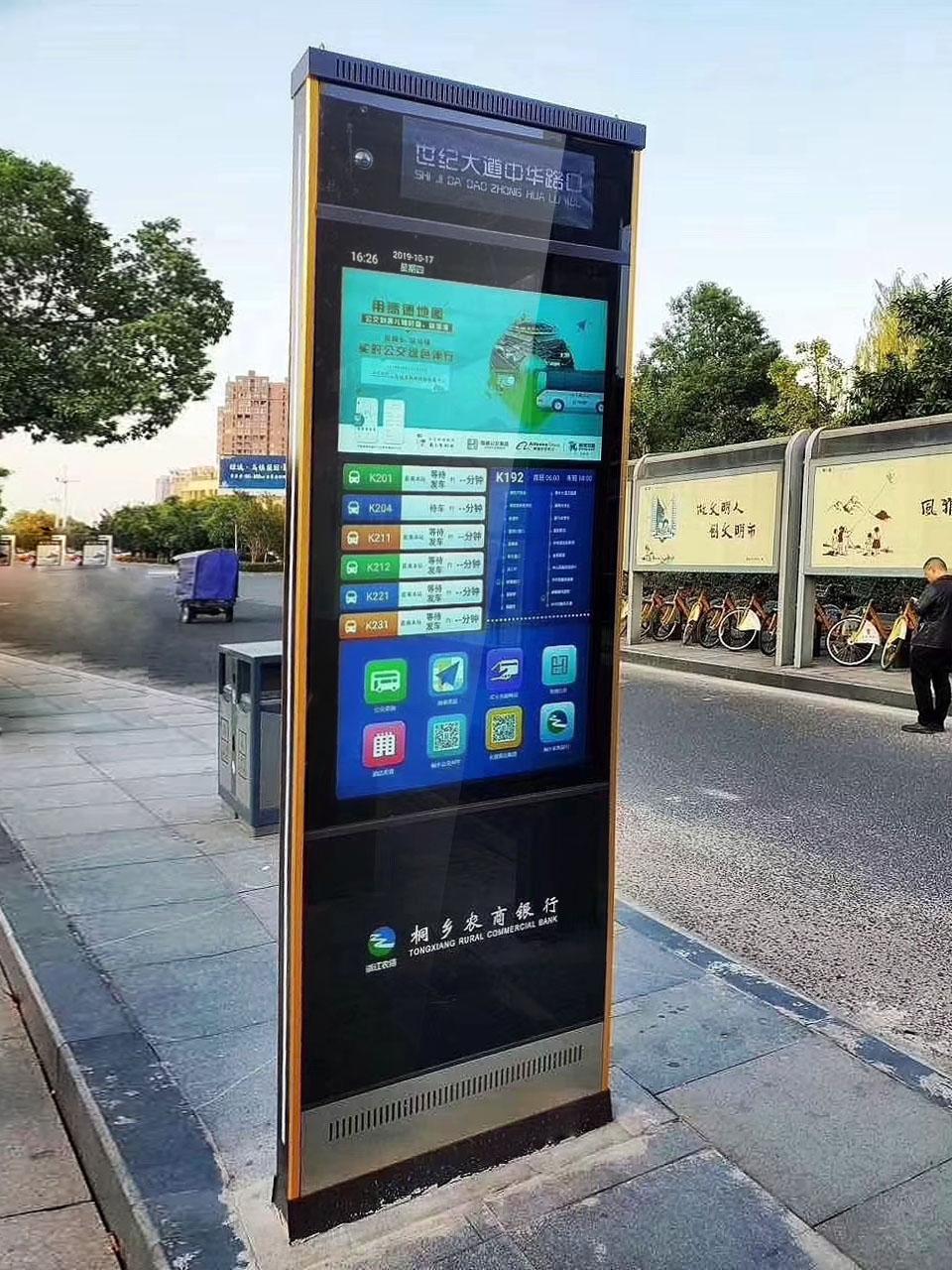
Most displays fight a losing battle against sunlight, washing out into a dim, unreadable haze the moment you step outside. E-ink turns that logic inside out. Instead of shining light through pixels from behind, these screens bounce ambient light off microscopic ink particles—so a sunny afternoon actually makes text sharper and easier to read, not harder. The brighter the day, the more contrast you get, just like a page in a paperback.
Because there is no backlight pushing against the sun, you also avoid the mirror-like glare that plagues glossy phone and tablet screens. The surface sits matte and calm, so you can read at a beach, on a mountain trail, or through a bus window without craning your neck or cupping a hand around the display. A few models add a lightly etched glass layer or anti-reflective coating, which nudges things even closer to paper.
This same design choice pays off in battery life. Without a backlight running constantly, an e-ink device can idle for weeks, sipping power only when the page changes. For hikers, sailors, and anyone who spends long stretches outdoors, that means one less gadget to babysit and one less screen to squint at under a cloudless sky.
Route Maps That Highlight the Fastest Transfer in One Tap
Most transit apps bury transfer options under layers of menus, forcing riders to zoom, pan, and squint at a tangle of colored lines. This map flips that. With a single tap on any station, the fastest transfer path lights up immediately—no toggling between screens, no guessing which platform connects to which line. The highlight cuts through the usual visual noise, showing only the relevant branches and walking segments, so even in a crowded hub like Shinjuku or Grand Central, the next move is obvious at a glance.
The one-tap rule applies everywhere on the map. Tap a departure point, and the optimal transfer glows in a distinct shade, while slower alternatives dim to background. If a delay shifts the best route, the highlight updates instantly, pulling a new path forward. It's the difference between studying a schematic and just knowing where to go.
Audio Alerts That Announce Your Stop Only When You’re Two Blocks Away
Most transit apps flood you with alerts for every stop along the route. This feature flips that approach: you stay silent and relaxed until your destination is genuinely close. The system tracks your real-time position against the upcoming stop, then triggers only when you enter a two-block radius. No early pings, no constant checking—just one clear notification when it actually matters.
The logic is simple on purpose. Two blocks gives you enough time to gather your things, stand up, and move toward the door without rushing. It also avoids the annoyance of an alert that fires while you're still fifteen minutes away. Because the trigger uses a precise geofence around the target stop, it works reliably in dense urban areas where GPS drift can otherwise cause false alarms.
What makes this different from generic arrival estimates is the focus on action, not information. You don't need to know you're passing stop number seven. You need to know when to stop reading, pause your podcast, or wake up from a nap. By narrowing the alert window to exactly two blocks, the audio cue becomes a useful interruption instead of background noise.
Brightness Sensors That Match the Screen to the Sky
The moment you step from a dim hallway into full sunlight, most screens either blind you or become unreadable. A brightness sensor that matches the display to the sky changes that dynamic by continuously sampling ambient light and adjusting the backlight in real time. Instead of relying on fixed presets, the sensor reads the changing intensity and color temperature of your surroundings, then nudges the screen to a level that feels natural—whether you are under fluorescent office lights, a shaded tree, or direct midday glare.
What makes this approach effective is the pairing of a wide-dynamic-range photodiode with a smoothing algorithm. The sensor does not simply crank brightness up or down in sudden jumps; it ramps adjustments over a few hundred milliseconds, mimicking the way your eyes adapt. This prevents the distracting flicker that often accompanies manual or threshold-based auto-brightness. The result is a display that seems to breathe with the environment, keeping contrast and legibility without calling attention to itself.
For devices used across highly variable lighting—phones, e-readers, outdoor signage, or vehicle dashboards—this sky-matching behavior reduces eye strain and saves battery, since the panel rarely runs brighter than necessary. It also preserves color accuracy: by compensating for both luminance and slight shifts in ambient color, the sensor helps whites stay neutral rather than turning blue under shade or yellow under warm indoor bulbs. In practice, users forget the feature exists, which is exactly the point. The screen simply feels right wherever they happen to be.
Live Occupancy Counts Before the Bus Doors Open
Standing on the platform, most riders size up a bus only after it pulls in. By then, the doors are already opening and the decision is made for them. Live occupancy counts flip that sequence. Small displays above the stop, or a glance at the transit app, show how many passengers are on board before the bus even rounds the corner. That early signal turns a guess into a choice: wait for a quieter one, move toward the rear door, or let this one pass entirely.
The numbers update as people get on and off, so the figure you see isn't stale. If the 7:42 is listed as 38 riders and the 7:49 as 12, you can trade seven minutes for a seat and some breathing room. The same count helps drivers and dispatchers spot overloaded runs, but for the person at the curb it solves a simpler problem: knowing whether the next bus is worth boarding before it arrives.
Accessibility is where this gets quietly useful. A wheelchair user or someone with a stroller can tell in advance if the securement area is likely free, rather than waiting for the doors to open and finding the space taken. It's not a guarantee of comfort, just a plain reading of how full the bus already is. That's often enough to make the wait feel less like a lottery.
FAQ
They integrate real-time arrival data, service alerts, and even local information into a single interactive surface, shifting from static schedules to adaptive urban interfaces.
Several designs use text-to-speech buttons or high-contrast modes and tactile markers, ensuring spoken next-bus updates and easier navigation without relying solely on sight.
Many signs now push live disruption notices and suggest alternate lines directly on the screen, so riders can adjust before they reach the platform or curb.
They consume very little energy and remain readable in bright sunlight, making them ideal for off-grid bus stops and reducing ongoing infrastructure costs.
Touchscreens let riders explore full network maps, plan multi-leg trips, or check nearby bike-share availability, turning a passive sign into a planning tool.
Built-in ambient light sensors adjust brightness automatically, and some models include emergency call buttons or flashing beacons that activate with panic alerts.
Yes, many have battery backups or low-power e-ink modes that keep last-known schedules visible for hours, so the stop isn't left completely blank.
Conclusion
Bus stops have long been the most overlooked part of a commute—a faded timetable, a scratched map, a countdown that guesses. The latest digital bus stop signs throw that old model away. Arrival times now recalculate every five seconds, not every minute, so the display finally reflects what's happening on the road right now instead of serving up a polite lie that slowly drifts. E-ink screens hold their own in direct sunlight without any backlight, which means you can read the next departure from across the street at noon. Brightness sensors go a step further, tuning the whole panel to match the sky—dim under shade, sharp under glare—so the sign never blinds you at night or washes out in the afternoon.
Navigation gets smarter too. A single tap on the route map highlights the fastest transfer instead of forcing riders to trace spaghetti lines with a finger. Audio alerts are timed to your position: the sign announces your stop only when you're two blocks away, not for every intermediate stop, which spares locals the noise and gives visitors a clear cue. Live occupancy counts appear before the doors open, letting you decide whether to squeeze onto the crowded 42 or wait four minutes for the emptier one behind it. Together these features turn a static pole into a small transit concierge—one that updates in real time, reads the light around it, and gives riders the exact information they need at the exact moment it becomes useful.
Contact Us
Contact Person: Leo
Email: [email protected]
Tel/WhatsApp: +86 18901905138
Website: https://www.zemsogroup.com/